Monday, 14 January 2008

How to transform your Windows Mobile device into a personal travel assistant

If you are one of these people always on the move, why not explore the potentialities of your Pocket PC or Smartphone? Clever applications can help you to convert your WM device into the ideal travel organiser and companion.

The latest version of WorldMate Professional, created by MobiMate is an all-in-one travel application. It offers most of the basic information that people is likely to need while away, especially on a business trip. There are 5 world clocks, a world map (with cities localizer), global 5 days weather forecast, a currency converter, measurements conversion and a table displaying clothing sizes in different countries.


The Pocket PC version also brings a Tip/Tax Calculator and a Travel Itinerary Manager (where you can record details from flights, hotels, car rentals and meetings). All these services are free of charge, but if you want, you can subscribe for the PRO version (US$39.95 for Smartphone and US$74.95 for Pocket PCs), which offers extra services such as Satellite Weather Imagery and Real-time Flight status (covering most of the airlines).

Overall the MobiMate is easy to use. It has lots of comprehensive graphics, works on a multilingual platform (English, French, Italian, German and Spanish) and the user can also select some of the functions to be always displayed on the Home Screen.
The basic version can be downloaded for free at the MobiMate website.

Pocket Earth 3.4 (by Informap Technology Center Inc) is another clever application that can help you to find your way around the globe. It displays an interactive set of 3D maps of the Earth, with VGA resolution (640x480). The user can locate cities by name and measure distances from multi-points. There are also colourful atlas maps in different formats (e.g. physical, political, etc), as well as sun and moon info. In addition the application brings useful information about several cities of the world, population and time. Other advanced features are GPS support and real-time weather forecast. It works with Windows Mobile Pocket PCs (2000 and all later) and can be bought online for around £10 (US$ 19). A trial version is available.


Not as complete, but also informative is the latest version of the Kai's City Info (made by Kaisoft /Pocketkai). It comprises as database with 472 Cities of the world. For each of them it gives information such as time-zone index, phone codes, airport codes, latitude/longitude, summertime, location on the map and GPS position (when available in the device). It also calculates the distance between two cities and time differences. It works with all versions of Windows Mobile for Pocket PC (from 2000 to WM6) and can be downloaded for around £5 (US$ 10).

Even if you are not on the road very often it still worthy to have a look in any of these applications, since you can get a lot of interesting information from them.


Friday, 11 January 2008

Next generation of UI applications adding a cool-looking to Windows Mobile devices

A while ago the Windows Mobile team announced the creation of “Neo”, an innovative user interface for an upcoming T-Mobile Smartphone (Shadow). This imbedded application converts the homescreen (“Today”) shipped by Microsoft into a cool-looking page, full of plug-ins, which animates when the user navigates up and down.

Now it seems that a new trend has started, as more of these UI applications start to become available, promising to add more interactivity and fresh appearance to the static Windows Mobile interface (that hasn't changed much since the Pocket PC 2nd Edition/2003).

Spb Mobile Shell adds a Vista inspired look to Windows Smartphones and Pocket PC interface. The initial screen can be customized to use for example analogue or digital clocks, display chosen elements and change between different colour themes. The menus are designed for one hand navigation and contain not only programs, but also actions. The Vista style icons and animation make it look really nice too. This application costs around £15 (US$ 30) and can be downloaded at the spb software house website or at the O2 XDA and Dell Axim pages.

“Home”, is a new application from “Pointui” (pronounced point-you-i), which transforms the Today screen of Pocket PCs into an animated interface, very similar to the iPhone. Each of the Today items (clock, date/calendar, tasks, etc.) occupies one full page, and there are also pages for new functions such as wheather forecast and animated launchers for applications. The user can control it via touch or thumb with the directional button. It is easy to use and looks great. The software is a BETA version; compatible with Windows Mobile 6, 5 and 2003 and it can be downloaded for free at the Pointui site.

After checking on any of these cool applications you’ll realise that there’s no more reason to be ashamed with the current appearance your Windows Mobile UI.


Friday, 14 December 2007

XOBNI is INBOX backwards. And it makes MS Outlook look good.


Who's your number 1 email contact??

Fred Wilson posted back in September about this app and hey, it only taken me 3 months to get a download invite but hey, I got there in the end. XOBNI is cool: its a plugin which adds a new panel of information in your Outlook Window. Information includes:


  • information on the sender: how many emails sent/received, usage patterns, contact details and ranking
  • people connected to the sender
  • your conversations with the sender
  • files exchanged with the sender
You can have a lot of fun working out your top ten ranking email buddies but the best thing is the "threaded email conversations" panel.
Let me explain: I hate email filing. And I'm not a fan of rules and filters. (I also hate Outlook but work ensures I experience Outlook Monday to Friday 9 to5)
Anyway, the point is everything tends to stay in my inbox which makes it a nightmare; so much information is buried in there like files, conversations and ideas which are time consuming to find again 2 weeks or 12 months later.

Now, here's the good part: Xobni shows the sender information, connections, conversations etc in panels. Click on any conversation (which is grouped by "email subject") and one new panel pops up with the conversation thread. Who said what and when. You can use the + and - slider to show as much or as little of the threads.

Xobni is a really simple, fast way to make your email activity productive activity. Highly recommended. Go to Xobni now!

Tuesday, 11 December 2007

OVI: has Nokia declared war on the telco operators?


Last week saw the Nokia World Forum in Amsterdam. Apart from big ppts and beach parties, what really happened? http://www.lbszone.com/content/view/2653/2/ did a very comprehensive report. For me, there is a couple of points worthy of note:
  1. finally we get something to replace the shonky Nokia PC Suite: OVI, a dashboard for your digital life. Basically a webservice for Nokia users to connect, sync and collaborate their media whether its music, maps or videos. Its a social networking service too: sync your contacts and get collaborating and communicating. OK, its not a replacement; it does something different and its a massive step forward!
  2. free content: free music, free maps. Nokia did a deal for free music downloads for a year (along with their partner Universal Music Group) and you get free map data too (just pay for the data connection). This is a good start.
  3. gaming: I don't know for certain but Ovi for games will be great as long as they are not tied to one games publisher. There are lots of good games out there from a variety of companies.
So what does this mean?
"Web NG" or "web next generation" was an expression used at the conference. It means Web 2.0 plus context awareness. Basically, all the "C's" are important: context, collaboration, contacts, content. And OVI is Nokia's platform to deliver it.

Nokia is already the market supremo. And this puts Nokia even further ahead. Admittedly the inital OVI offering might be lacking but over time, they will build upon this platform, excite users and really take the battle to the telcos.
OVI is a webservice that encapsulates user generated media, encourages downloading and sharing and other properties of social networking has been in demand for quite sometime yet no other handset manufacturer has delivered this (at least I don't think they have).
Maybe its because no one is as big as Nokia and let's face it, you need resources, customers and a strong brand to move into telco territory.

Its all about who owns the customer. Who deals directly with the customer. Nokia's wide ranging, feature rich service is a breath of fresh air compared with the walled gardened, money grabbing approach of the telco operators. Despite Vodafone's presence, it was clear there will be battle ahead. Who knows best what the customer wants? Nokia's Smartphone 360 research made interesting observations and I don't think Vodafone agreed with them all!

Who owns the customer? Who deals directly with the customer? Telco operators watch out. Wifi connectivity will come. Now Nokia wants to deliver the content directly.

Thursday, 6 December 2007

Predictive text entry coming soon to a mobile near you

ok, I've been checking out Zach's blog Symbianinmotion.com. One app that has received critical acclaim is Adaptxt language software.

Its cool: it actually maps itself to your individual writing style so when it predicts, it predicts something that is:

  1. relevant
  2. in context
  3. personal to me
  4. generally something useful and not the random nonsense you get from T9
It sounds heavenly. Imagine, predictive text that actually works.! :)
The Nokia S60 version isn't available yet but you can get info here from the developer's website.
Symbianinmotion.com has a review (cos they got hold of the software somehow!) with screenshots and video.

Nice.
Windows Mobile versions are available. I just tied it on my iPaq and it works well...with qwerty and stylus. Here is a screenshot to wet your tastebuds:


Sign up to be told when the symbian beta is released on the KeyPoint site.

Why Android will win

Matt Lewis from Archart has written a great piece about Android and makes great observations on the fragmented Linux mobile world. Get the article here. Below are some salient points.

On the current Linux mobile platform groups like Mizi, Access, Limo, Lips etc Matt says:
"from the perspectives of hardware integration and application execution, they are largely incompatible with each other"

and
"the handset market share they currently enjoy is tiny – most have no market share at all"

ok, so what's so special about Android then? Its another linux platform right? Yes, OEMs can modify it and not share modifications right? Yes, so won't it be yet another pain in the ass OS? No because Matt points out

a/ the Android source code is under the the Apache licence with a little bit extra: the OEM has to sign a "compatability pledge not to break interoperability"
b/ Android runs java apps. Admittedly developers need to test how rich and efficient Dalvik is, but if successful, Matt predicts developers will jump to this so they only have a single Virtual Machine to test against.

Who'd bet against Google? Matt's observation on what telco operators want (see below) says Google's mobile strategy is bang on the money. They might not topple Nokia's dominance and are behind Windows Mobile for now, but Google's Android can drive the Linux mobile OS forward as a coherent force.
"Operators are demanding that their handset portfolios consolidate around two or three platforms so that rich applications can be proliferated as widely across their subscriber base as possible, and the operators’ OEM suppliers are having to respond. We are aware of some service providers seeing as much as 50% of their data traffic channelled to the MySpace site alone, and as such services evolve off the browser into widgets and dedicated apps, operators cannot afford to maintain a catalogue of application variants to match a disparate handset portfolio."

Android might not be totally open thanks to Google's checks and balances on what OEMs can and can't do, but having this overlord is for the greater good.

Here, a youtube demo of Android.

Wednesday, 5 December 2007

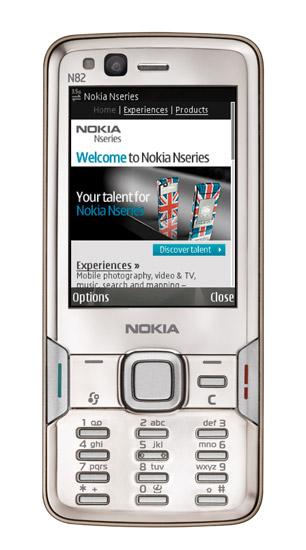
Keep your moments with you: the Nokia N82


oh my god. how nice is this phone?
"keep your moments with you" is the sign off from the flash intro on the Nokia website. Check the demo here . With a 5mega pixel camera and Carl Zeiss lense, you know you can dump your digi camera. And in encouraging uploading to flickr, the days of bad quality mobile blogging are numbered.

I gotta have it.

Mp3 player big deal. You'd expect it but I think you get free downloads for a year following the tie up with UMG. Err ok, sounds good.

GPS built in: for a phone, that's still a fairly decent, cool, new feature but what gps chip is it? The N95 gps is a dog. One guy I met who should be in the know claimed it was the position in the device. I don't think so. If it was sirf III, you'd get a reception in das bunker. So, fingers crossed the reception is good. But again, Nokia have gone for free maps. Just pay for the data connection getting them. Vodafone customers watch out: from personal experience this can be costly. Let's see if the operators play fair (yeh right I here you say)


One last comment: iphone? what iphone. The camera is pants. The sms text entry is pants. Googlemaps dont work too well (see the Gadget show iphone review) .....so you know where you can stick your iphone? In the empty N82 box and fling it in your bottom drawer!